Tutorial
Three moves against a real DHIS2 instance: one read, a schema gate on the answer, and
a write built from the validated value -- with a deliberate failure and a retry in between.
At the end you have a project on your machine, an instance serving a UI, a dhis2 connection,
and a pipeline that reads the play demo, refuses an answer that has moved, and rehearses an
import at the organisation unit the answer named.
Do the first half first
This is the second half of a two-part course. The basics, in dirigent's own documentation, makes the same three moves against Postman Echo: one HTTP request, a JSON Schema gate on the answer, and a send built from the validated value. Everything here is that page's shape with DHIS2 in the middle, so do it first and you will recognise every step. This page assumes nothing else.
A printable copy of this page: tutorial.pdf.
Everything below was run against the public DHIS2 demo,
https://play.im.dhis2.org/stable-2-43-1, version 2.43.1 -- the Sierra Leone database, with
the published admin / district credential. That instance is shared and it resets itself, so
nothing here writes to it: the one import is a rehearsal, and DHIS2 tells you exactly what it
would have done.
What you need: Python 3.13, uv, jq, and two terminals.
Every command below is run in the project directory.
Where these documents live
The pack keeps its documents on shelves and its tests hold every one of them to the pack's catalog. The tutorial's documents are not on a shelf: one of them is wrong on purpose, and a shelf that carries a broken document is a corpus you cannot trust. So they live here, in full, and you write them into your own project as you go.
1. A project, an instance, and the pack
dg init writes a uv project and the instance the project addresses. --pack adds this pack
to the project's dependencies, which is the whole of installing it:
uv tool install dirigent-cli
dg init dhis2-tutorial --template local --pack dirigent-dhis2 --password "the one you will use"
cd dhis2-tutorial
uv sync
2026-09-22T11:28:24.910+02:00 [info ] initialised [instance.initialised] directory=/home/you/dhis2-tutorial state=.dirigent/state schema=0001_baseline admin=admin template=local version=0.18.0 packs=["dirigent-dhis2"]
It creates the state directory, migrates the schema, creates the first admin, and mints that
admin one token -- shown once, and written to the project's .env, where the local profile
reads it. Nothing has to be pasted anywhere. uv sync then builds the project's environment
from the pyproject.toml it wrote, so every uv run dg below is the runtime this project
pins, with the pack in it.
The last lines it prints are about the other thing it wrote into that .env:
DIRIGENT_SECRET_KEY is in .env beside it, and every command run in
this directory reads it: it is what connection secrets are sealed with, and
under another key the instance cannot open what it stored.
The connection in the next section carries a DHIS2 password, and a connection secret is sealed
at rest with that key. A project's .env is a settings layer, so the key is in force for every
command run in this directory, dg dev included, and there is nothing to export. Keep the
file: a secret is sealed under the key that was set when it was stored, and an instance running
under a different key finds a connection it cannot read.
Start the instance in a second terminal, in this directory:
dg dev is one process holding the API, the web UI, the scheduler, one worker and a SQLite
file under .dirigent/state/. It keeps running; leave it. The UI is at
http://127.0.0.1:3333, and admin logs in there with the password you just gave.
Back in the first terminal, the pack is in the catalog because it is installed -- there is no registration step and no config file:
┏━━━━━━━━━━━━━━━━━━━━━━━━━━━━━┳━━━━━━━━━━┳━━━━━━━━━┳━━━━━━━━━━━━━━━━━━━━━━━━━━━━━━━━━━━┓
┃ id                          ┃ kind     ┃ plugin  ┃ summary                           ┃
┡━━━━━━━━━━━━━━━━━━━━━━━━━━━━━╇━━━━━━━━━━╇━━━━━━━━━╇━━━━━━━━━━━━━━━━━━━━━━━━━━━━━━━━━━━┩
│ dhis2.analytics_query       │ operator │ dhis2   │ Run a DHIS2 analytics query.      │
│ dhis2.analytics_run         │ operator │ dhis2   │ Run the DHIS2 analytics tables    │
│                             │          │         │ job.                              │
│ dhis2.data_set_complete     │ sensor   │ dhis2   │ Wait for a DHIS2 data set to be   │
│                             │          │         │ marked complete.                  │
│ dhis2.data_value_set_export │ operator │ dhis2   │ Export a DHIS2 data value set.    │
│ dhis2.data_value_set_import │ operator │ dhis2   │ Import a data value set into      │
│                             │          │         │ DHIS2.                            │
│ dhis2.metadata              │ operator │ dhis2   │ Read a DHIS2 metadata resource.   │
│ dhis2.tracker               │ operator │ dhis2   │ Read DHIS2 tracker objects.       │
└─────────────────────────────┴──────────┴─────────┴───────────────────────────────────┘
storage schemes: -   connection kinds: dhis2, docker, email, git, http, kafka, rabbitmq,
slack, sql, webhook
Seven blocks in the dhis2 group, and dhis2 among the connection kinds. The same catalog is
the Blocks screen in the UI, where each block says how many of the pack's example documents use
it:
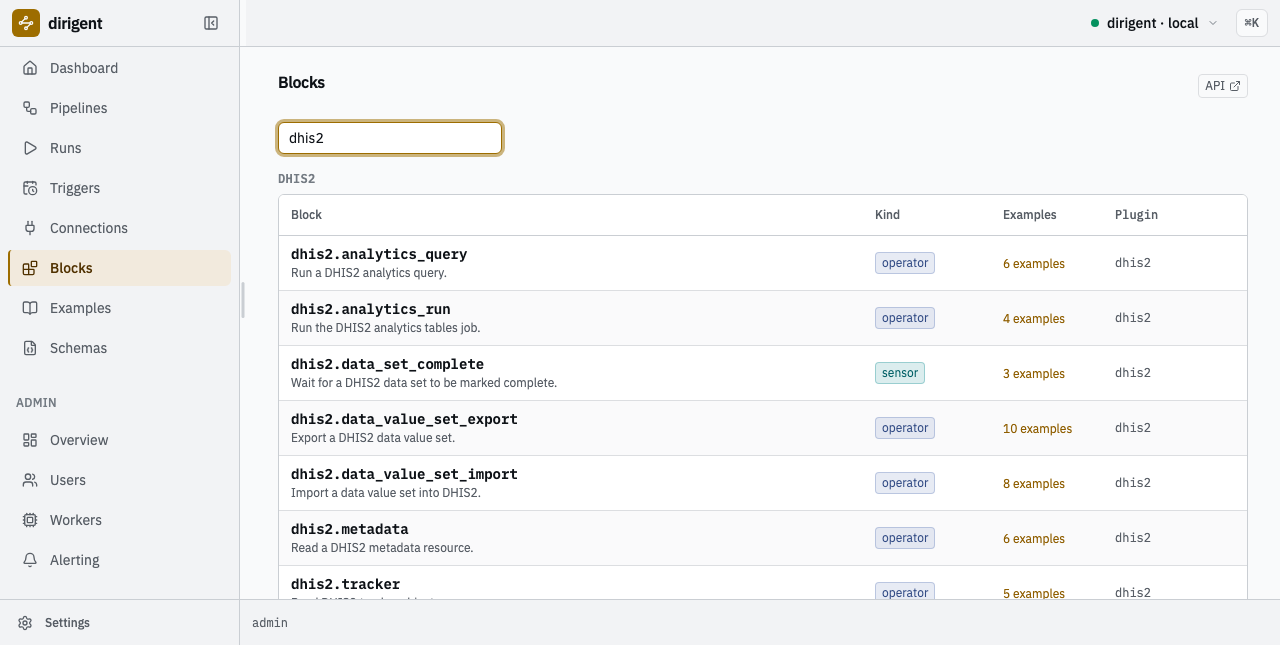
The seven blocks the pack contributes, as the instance's own catalog reports them.
2. The connection
One dhis2 connection is one instance and the credential to reach it. Create it exactly as
the connection reference shows:
uv run dg connection create dhis2 play \
  --name "DHIS2 play demo" \
  --set base_url=https://play.im.dhis2.org/stable-2-43-1 \
  --set basic_username=admin \
  --set basic_password=district
2026-09-22T11:29:19.806+02:00 [info ] created [connection.created] code=play connection_kind=dhis2 name="DHIS2 play demo" config={"base_url":"https://play.im.dhis2.org/stable-2-43-1","api_token":null,"basic_username":"admin","verify_tls":true,"timeout":"30s","basic_password":"***"}
The password is already withheld in the record the command answers with, and in every read after it.
Name the versioned host, not https://play.dhis2.org/demo. That alias redirects across hosts,
and a client that follows it drops the credential when the origin changes; resolve it once with
curl -sSI https://play.dhis2.org/demo and name what it resolves to.
Now check it:
2026-09-22T11:29:28.898+02:00 [info ] healthy [connection.checked] code=play healthy=true version=2.43.1
That one line is four facts: the URL resolves, TLS is as configured, the credential is
accepted, and the instance's version is 2.43.1 -- its own word for itself, read from
/api/system/info rather than guessed from an /api/N path.
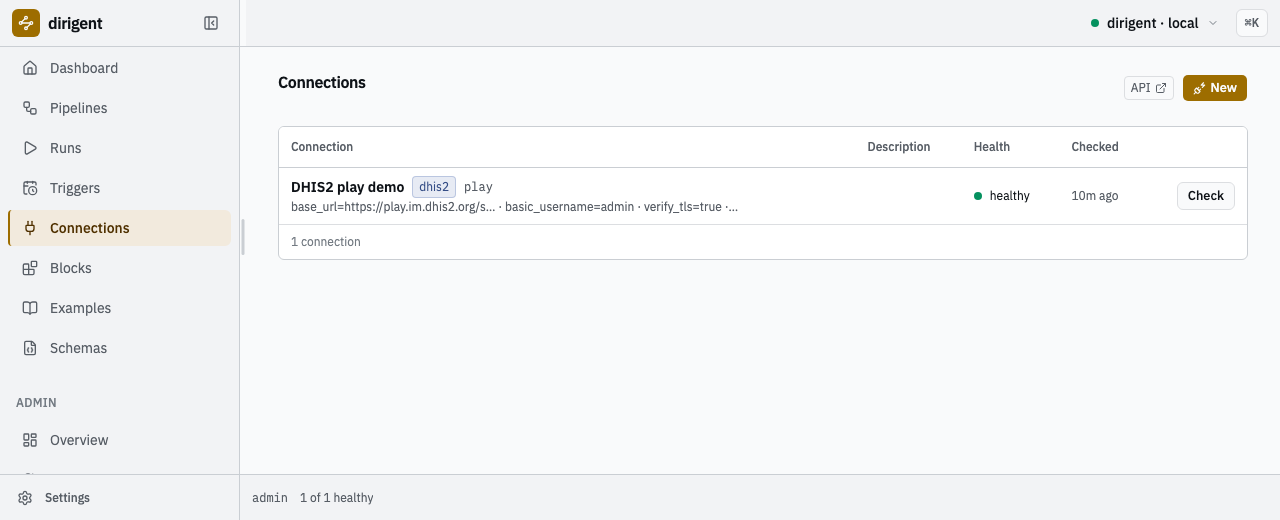
The connection on the Connections screen. The config summary is on the row; the password is not.
What the kind buys you. The same instance is reachable with an ordinary http connection
and http.request steps -- that is what the dhis2-http shelf
does, and it is the right answer for a call no block covers yet. A dhis2 connection is worth
more than a base URL and a header because it carries four things a raw HTTP step cannot:
- the version, resolved when the client is built, so
dhis2.metadatarefuses a collection name this instance does not publish instead of sending a request that will 404; - one credential, checked -- a token or a username and password, never both, and never neither, refused when the connection is written rather than when a step first runs;
- the format checkers
dhis2-uid,dhis2-periodanddhis2-code, which any schema on this instance may now assert with (section 4); - a failure classification that means the same thing in every block of the pack (section 6).
3. The first request
The smallest useful read: the organisation units directly under one chiefdom. Write
pipelines/dhis2-tutorial.yaml:
# Read the organisation units under one chiefdom of the DHIS2 play demo.
#
# dhis2.metadata reads a metadata collection through the accessor the instance's own version
# publishes, so resource is the collection name exactly as it appears in the API path.
# fields is the DHIS2 projection: it decides what comes back, and what it does not name does
# not arrive. filter is DHIS2's own syntax -- a property path, an operator, a value.

format: dirigent/v1
kind: pipeline
code: dhis2-tutorial
name: The DHIS2 tutorial pipeline
description: Read the organisation units directly beneath one unit, with their codes and levels.

tags: [dhis2, tutorial]

requires:
  blocks:
    - dhis2.metadata
  connections:
    - play

params:
  type: object
  properties:
    parent:
      type: string
      # A format the pack contributes. A run submitted with something that is not a DHIS2
      # uid is refused here, before a call is made.
      format: dhis2-uid
      default: YuQRtpLP10I
      description: The uid of the parent whose children are read. Badjia chiefdom by default.

steps:
  read:
    block: dhis2.metadata
    config:
      connection: play
      resource: organisationUnits
      fields: id,code,name,level
      filter: "parent.id:eq:${params.parent}"
      order: [name:asc]
requires is the document saying what it needs of an instance: the block ids and the
connection code. An instance missing one of them refuses the document rather than failing
halfway through a run.
Check it offline first -- no server, no DHIS2, no network:
2026-09-22T11:29:38.884+02:00 [info    ] valid                          [validation] code=dhis2-tutorial document=pipelines/dhis2-tutorial.yaml checked="document, offline"
  each step under the last one it waits for
    read  (dhis2.metadata)
2026-09-22T11:29:38.887+02:00 [info    ] valid                          [validated] documents=1 invalid=0
Then store it on the instance and run it:
dg apply sends every document in the project and stores each as an immutable version;
applying an unchanged document again is not a new version. dg run --watch streams the step
transitions and settles with the run:
run 01a0ac92-38dc-737a-8ab2-ffa099350a63
pipeline      dhis2-tutorial (version 1)
status        succeeded
triggered by  admin (token init)
duration      0.7s
items         -

steps
┏━━━━━━┳━━━━━━━━━━━━━━━━┳━━━━━━━━━━━┳━━━━━━━┳━━━━━━━━━━┳━━━━━━━━━━┳━━━━━━━┓
┃ step ┃ block          ┃ outcome   ┃ after ┃ attempts ┃ duration ┃ error ┃
┡━━━━━━╇━━━━━━━━━━━━━━━━╇━━━━━━━━━━━╇━━━━━━━╇━━━━━━━━━━╇━━━━━━━━━━╇━━━━━━━┩
│ read │ dhis2.metadata │ succeeded │ -     │ 1        │ 0.7s     │ -     │
└──────┴────────────────┴───────────┴───────┴──────────┴──────────┴───────┘

outputs
┏━━━━━━┳━━━━━━━━━━━━━━━━━━━━━━━━━━━━━━━━┓
┃ step ┃ output                         ┃
┡━━━━━━╇━━━━━━━━━━━━━━━━━━━━━━━━━━━━━━━━┩
│ read │ body={1 keys}  duration_ms=671 │
└──────┴────────────────────────────────┘
The answer itself is in the run, not on the screen. Every command writes records when its
output is not a terminal, so the whole answer is one jq away:
uv run dg runs show 01a0ac92-38dc-737a-8ab2-ffa099350a63 --json \
  | jq '.fields.attempts[] | select(.step_name == "read") | .output.body'
{
  "organisationUnits": [
    {
      "code": "OU_559",
      "name": "Ngelehun CHC",
      "id": "DiszpKrYNg8",
      "level": 4
    },
    {
      "code": "OU_167609",
      "name": "Njandama MCHP",
      "id": "g8upMTyEZGZ",
      "level": 4
    }
  ]
}
Two facilities, each with the four fields fields= asked for. The same run is on the Runs
screen of the UI, and choosing a step opens what it produced:
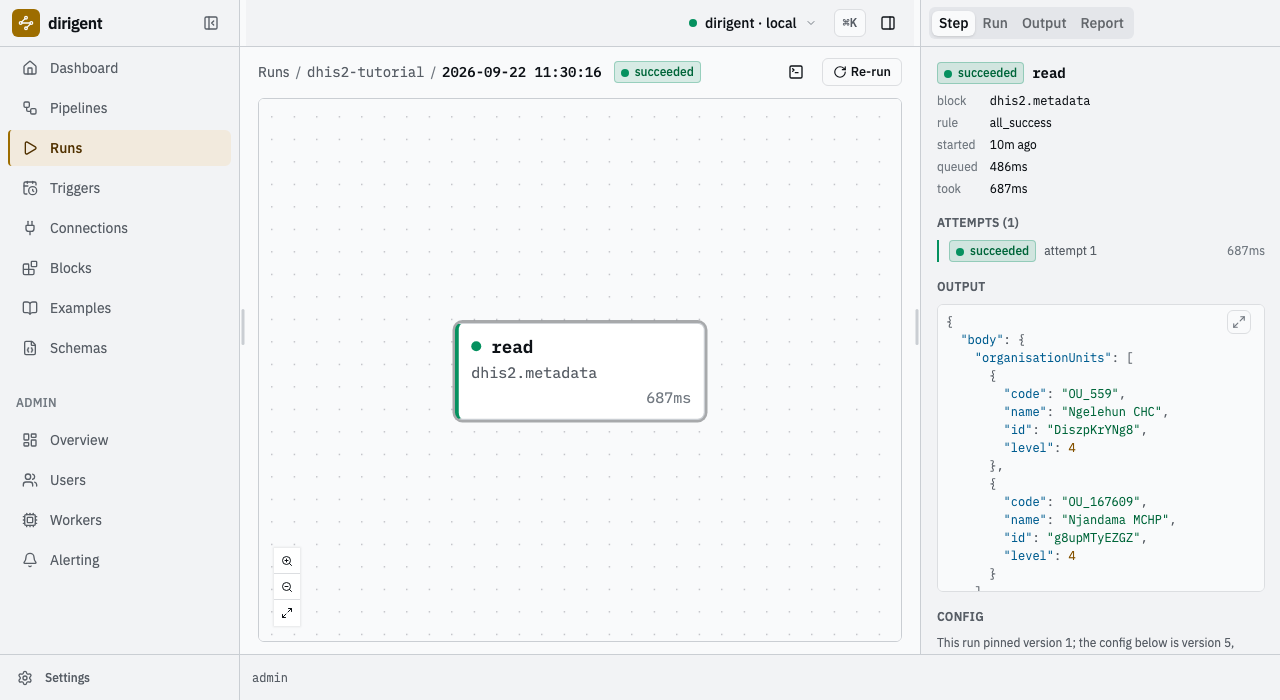
The run's only step, and the answer it stored, on the Runs screen.
4. The gate
A metadata read is a contract with a system you do not control. Write the contract down, and a payload that has moved stops at the step it arrived in rather than turning into something strange three steps later.
A schema is a document section, keyed by code, exactly the way connections are. Add it, and a
validate.schema step that names it:
schemas:
  tutorial-org-units:
    title: Organisation units, as this pipeline reads them
    type: object
    required: [organisationUnits]
    properties:
      organisationUnits:
        type: array
        minItems: 1
        items:
          type: object
          required: [id, code, name, level]
          properties:
            id: { type: string, format: dhis2-uid }
            code: { type: string, format: dhis2-code }
            name: { type: string }
            level: { type: integer, minimum: 1 }

steps:
  # ... read, unchanged ...

  check:
    block: validate.schema
    depends_on: [read]
    config:
      input: ${steps.read.output.body}
      schema: tutorial-org-units
format: dhis2-uid and format: dhis2-code are this pack's, and they assert because the pack
is installed. In JSON Schema a format annotates and nothing more; dirigent always hands its
validator a checker, and every installed pack's formats join it. A dhis2-uid is a letter and
ten alphanumerics; a dhis2-code is DHIS2's own code property, one to fifty characters, not
padded, on one line -- OU_559 is one. The third,
dhis2-period, turns up in the next section.
Now apply it:
2026-09-22T11:31:08.043+02:00 [error   ] this document carries its own schemas (tutorial-org-units), which an instance will not store: create them with `dg schema create` and let the document name them in requires.schemas [error] status=422 title="Unprocessable Content" code=server.document_refused params={"detail":"this document carries its own schemas (tutorial-org-units), which an instance will not store: create them with `dg schema create` and let the document name them in requires.schemas"} instance=/api/v1/pipelines/$apply
  - this document carries its own schemas (tutorial-org-units), which an instance will not store: create them with `dg schema create` and let the document name them in requires.schemas
That refusal is the rule worth learning early: a server stores no schema a document carries, exactly as it stores no connection a document carries. A schema is a thing the instance holds and a document names, so that two pipelines gating on the same shape are gating on the same shape.
A carried schema is still worth having, because a local run seeds what the document brought,
and a local run is the fast loop. Give it the connection it has nowhere else to read --
tutorial-connections.yaml:
# The connections a --local run has nowhere else to read. This credential is the play demo's
# own, published so that anyone may try the instance; a real instance's credential belongs in
# a connection on the server and never in a file beside the documents.

connections:
  play:
    kind: dhis2
    config:
      base_url: https://play.im.dhis2.org/stable-2-43-1
      basic_username: admin
      basic_password: district
steps
┏━━━━━━━┳━━━━━━━━━━━━━━━━━┳━━━━━━━━━━━┳━━━━━━━┳━━━━━━━━━━┳━━━━━━━━━━━━━━━━━━━━━━━━━━━━━┓
┃ step  ┃ block           ┃ outcome   ┃ after ┃ duration ┃ output                      ┃
┡━━━━━━━╇━━━━━━━━━━━━━━━━━╇━━━━━━━━━━━╇━━━━━━━╇━━━━━━━━━━╇━━━━━━━━━━━━━━━━━━━━━━━━━━━━━┩
│ read  │ dhis2.metadata  │ succeeded │ -     │ 1.1s     │ body={1 keys}               │
│       │                 │           │       │          │ duration_ms=1111            │
│ check │ validate.schema │ succeeded │ read  │ 0.0s     │ value={1 keys}              │
└───────┴─────────────────┴───────────┴───────┴──────────┴─────────────────────────────┘
--local applies and runs the document in a throwaway instance in a temporary directory and
deletes it on the way out. Same apply, same engine, same worker loop, no server.
Break it
The gate is only worth what it catches, so catch something. fields= is the DHIS2 projection:
what it does not name does not come back. Drop code from it -- the kind of edit that looks
harmless -- and run the same document again:
steps
┏━━━━━━━━━━━━━━━┳━━━━━━━━━━━━━━━━━┳━━━━━━━━━━━┳━━━━━━━┳━━━━━━━━━━┳━━━━━━━━━━━━━━━━━━━━━┓
┃ step          ┃ block           ┃ outcome   ┃ after ┃ duration ┃ output              ┃
┡━━━━━━━━━━━━━━━╇━━━━━━━━━━━━━━━━━╇━━━━━━━━━━━╇━━━━━━━╇━━━━━━━━━━╇━━━━━━━━━━━━━━━━━━━━━┩
│ read          │ dhis2.metadata  │ succeeded │ -     │ 1.1s     │ body={1 keys}       │
│               │                 │           │       │          │ duration_ms=1127    │
│ check  1 warn │ validate.schema │ failed    │ read  │ 0.0s     │ -                   │
└───────────────┴─────────────────┴───────────┴───────┴──────────┴─────────────────────┘

check failed  validate.schema, attempt 1, rejected
  at $.organisationUnits[0]: 'code' is a required property
  last log lines:
    error: failed
DHIS2 answered 200. The read succeeded. The answer was simply not the answer this pipeline was
written against, and the gate says so in one line with the path in it: $.organisationUnits[0],
'code' is a required property. Note the class: rejected. The same value against the same
schema will never pass, so it is not retried.
Put code back and it passes again.
The formats guard the way in as well as the way out. A parameter declared format: dhis2-uid
refuses a run before a single call is made:
uv run dg run --local pipelines/dhis2-tutorial.yaml \
  --connections tutorial-connections.yaml -p parent=ImspTQPwCq
2026-09-22T11:32:23.337+02:00 [error ] parameter parent is invalid: 'ImspTQPwCq' is not a 'dhis2-uid' [error] status=3 title=Refused code=cli.guard_refused params={"detail":"parameter parent is invalid: 'ImspTQPwCq' is not a 'dhis2-uid'"}
Ten characters instead of eleven. Nothing ran.
Hand the shape to the instance
Lift the schema out of the document into schemas/tutorial-org-units.json. Its own keywords
carry its identity: $id becomes the code it is addressed by, title its name, description
its body.
{
  "$schema": "https://json-schema.org/draft/2020-12/schema",
  "$id": "tutorial-org-units",
  "title": "Organisation units, as the tutorial reads them",
  "description": "An organisationUnits read projected to id, code, name and level.",
  "type": "object",
  "required": ["organisationUnits"],
  "properties": {
    "organisationUnits": {
      "type": "array",
      "minItems": 1,
      "items": {
        "type": "object",
        "required": ["id", "code", "name", "level"],
        "properties": {
          "id": { "type": "string", "format": "dhis2-uid" },
          "code": { "type": "string", "format": "dhis2-code" },
          "name": { "type": "string" },
          "level": { "type": "integer", "minimum": 1 }
        }
      }
    }
  }
}
Then delete the document's whole schemas: section and declare the code instead:
requires:
  blocks:
    - dhis2.metadata
    - validate.schema
  connections:
    - play
  schemas:
    - tutorial-org-units
The check step does not change: it named the schema by code all along, and the code now
resolves to the one the instance holds.
update dhis2-tutorial  version 2 (/home/you/dhis2-tutorial/pipelines/dhis2-tutorial.yaml)
  steps added: check
steps
┏━━━━━━━┳━━━━━━━━━━━━━━━━━┳━━━━━━━━━━━┳━━━━━━━┳━━━━━━━━━━┳━━━━━━━━━━┳━━━━━━━┓
┃ step  ┃ block           ┃ outcome   ┃ after ┃ attempts ┃ duration ┃ error ┃
┡━━━━━━━╇━━━━━━━━━━━━━━━━━╇━━━━━━━━━━━╇━━━━━━━╇━━━━━━━━━━╇━━━━━━━━━━╇━━━━━━━┩
│ read  │ dhis2.metadata  │ succeeded │ -     │ 1        │ 0.6s     │ -     │
│ check │ validate.schema │ succeeded │ read  │ 1        │ 0.0s     │ -     │
└───────┴─────────────────┴───────────┴───────┴──────────┴──────────┴───────┘
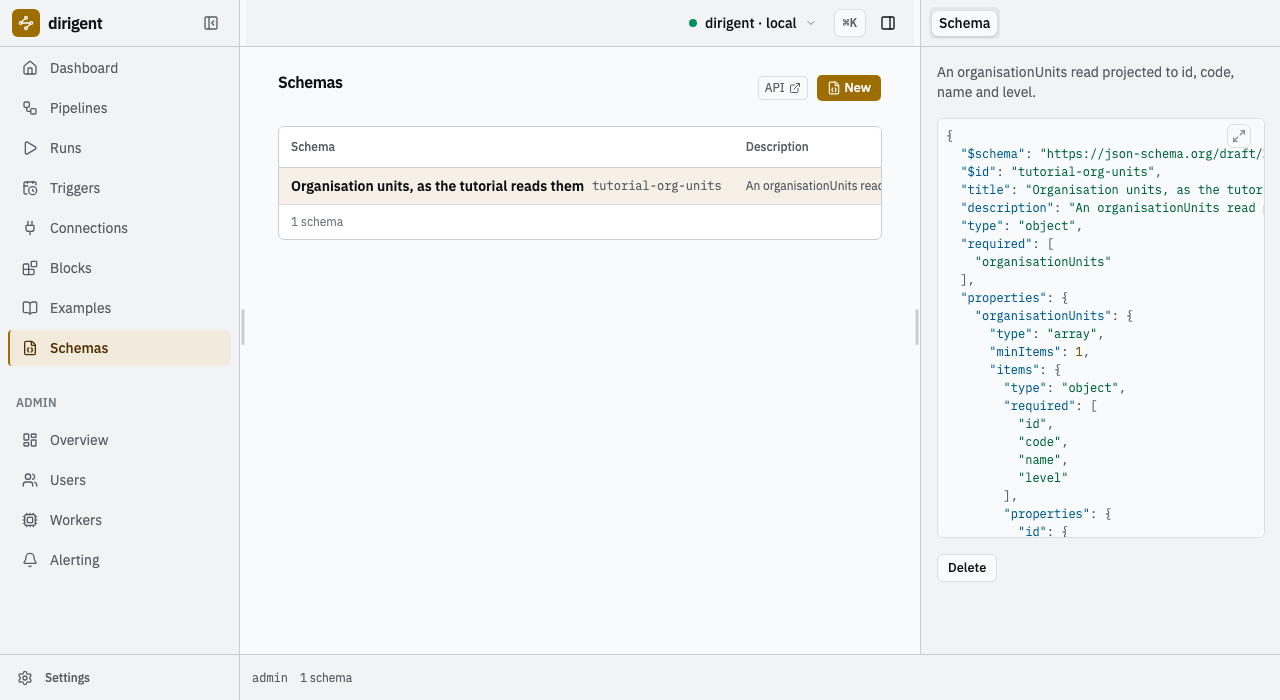
The shape the instance now holds. Any pipeline on this instance may gate on it by code.
The step's schema box shows the same shape: the code it names opens to the body the instance
holds.
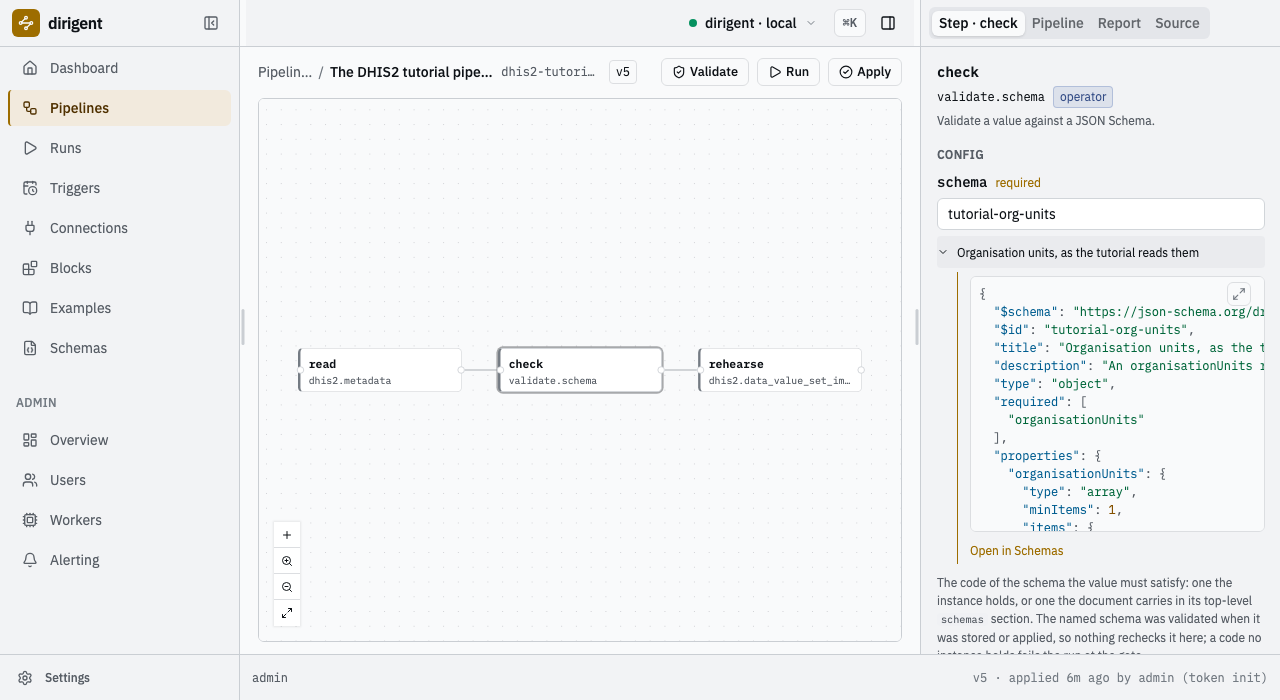
The code in the box, the shape behind it, and a link to the row it came from.
5. The send
Now write something back -- built from the value the gate passed, and rehearsed.
validate.schema hands its input on unchanged as value, which makes the gate a waypoint:
every step past it provably received the shape. So the write does not repeat the read's uid, it
reads it out of the gate:
  rehearse:
    block: dhis2.data_value_set_import
    depends_on: [check]
    config:
      connection: play
      data_values:
        # The envelope's dataSet, period and orgUnit are the defaults each value inherits.
        # The org unit is read out of the gate's own output, so the write goes where the
        # validated answer says and nowhere else.
        dataSet: BfMAe6Itzgt
        period: ${params.period}
        orgUnit: ${steps.check.output.value.organisationUnits.0.id}
        dataValues:
          - dataElement: s46m5MS0hxu
            categoryOptionCombo: Prlt0C1RF0s
            attributeOptionCombo: HllvX50cXC0
            value: "12"
          - dataElement: s46m5MS0hxu
            categoryOptionCombo: psbwp3CQEhs
            attributeOptionCombo: HllvX50cXC0
            value: "7"
      # Nothing is written. Dropping this line turns the same document into a real import.
      dry_run: true
A reference walks a value with dots, and an array index is a dot too:
${steps.check.output.value.organisationUnits.0.id} is the first validated unit's uid --
Ngelehun CHC, because the read is ordered by name. Every other uid here is a real one on the
play demo: BfMAe6Itzgt is the monthly "Child Health" data set, s46m5MS0hxu is "BCG doses
given", Prlt0C1RF0s and psbwp3CQEhs are its "Fixed, <1y" and "Fixed, >1y" cells, and
HllvX50cXC0 is the default attribute option combo. A value is always a string on the wire,
whatever the data element's value type says.
Add the period parameter beside parent, held to the third format:
    period:
      type: string
      format: dhis2-period
      default: "202507"
      description: The ISO period the rehearsed values belong to.
And while you are in the file, give the read a retry budget. The next section is what it is for:
update dhis2-tutorial  version 3 (/home/you/dhis2-tutorial/pipelines/dhis2-tutorial.yaml)
  steps added: rehearse
  steps changed: read
  params changed
2026-09-22T11:33:16.683+02:00 [info    ] import summary                 [log rehearse] status=SUCCESS imported=0 updated=2 ignored=0 deleted=0 conflict_count=0

steps
┏━━━━━━━━━━┳━━━━━━━━━━━━━━━━━━━━━━━━━┳━━━━━━━━━━━┳━━━━━━━┳━━━━━━━━━━┳━━━━━━━━━━┳━━━━━━━┓
┃ step     ┃ block                   ┃ outcome   ┃ after ┃ attempts ┃ duration ┃ error ┃
┡━━━━━━━━━━╇━━━━━━━━━━━━━━━━━━━━━━━━━╇━━━━━━━━━━━╇━━━━━━━╇━━━━━━━━━━╇━━━━━━━━━━╇━━━━━━━┩
│ read     │ dhis2.metadata          │ succeeded │ -     │ 1        │ 0.7s     │ -     │
│ check    │ validate.schema         │ succeeded │ read  │ 1        │ 0.0s     │ -     │
│ rehearse │ dhis2.data_value_set_i… │ succeeded │ check │ 1        │ 0.7s     │ -     │
└──────────┴─────────────────────────┴───────────┴───────┴──────────┴──────────┴───────┘

outputs
┏━━━━━━━━━━┳━━━━━━━━━━━━━━━━━━━━━━━━━━━━━━━━━━━━━━━━━━━━━━━━━━━━━━━━━━━━━┓
┃ step     ┃ output                                                      ┃
┡━━━━━━━━━━╇━━━━━━━━━━━━━━━━━━━━━━━━━━━━━━━━━━━━━━━━━━━━━━━━━━━━━━━━━━━━━┩
│ read     │ body={1 keys}  duration_ms=668                              │
│ check    │ value={1 keys}                                              │
│ rehearse │ status=SUCCESS  imported=0  updated=2  ignored=0  deleted=0 │
└──────────┴─────────────────────────────────────────────────────────────┘
DHIS2's import summary is the step's output, parsed: a status, the four counts, and the
conflicts. updated=2 means the instance resolved both values, checked each against its data
element's value type, decided it would have revised two existing values -- and then threw the
result away, because dry_run was on. A refused value would be a row in conflicts in the
instance's own words, and a summary whose status is ERROR fails the step rather than
reporting success with bad news inside it.
uv run dg runs show 01a0ac94-7b90-731d-b6b4-cb36ae764cf5 --json \
  | jq '.fields.attempts[] | select(.step_name == "rehearse") | .output'
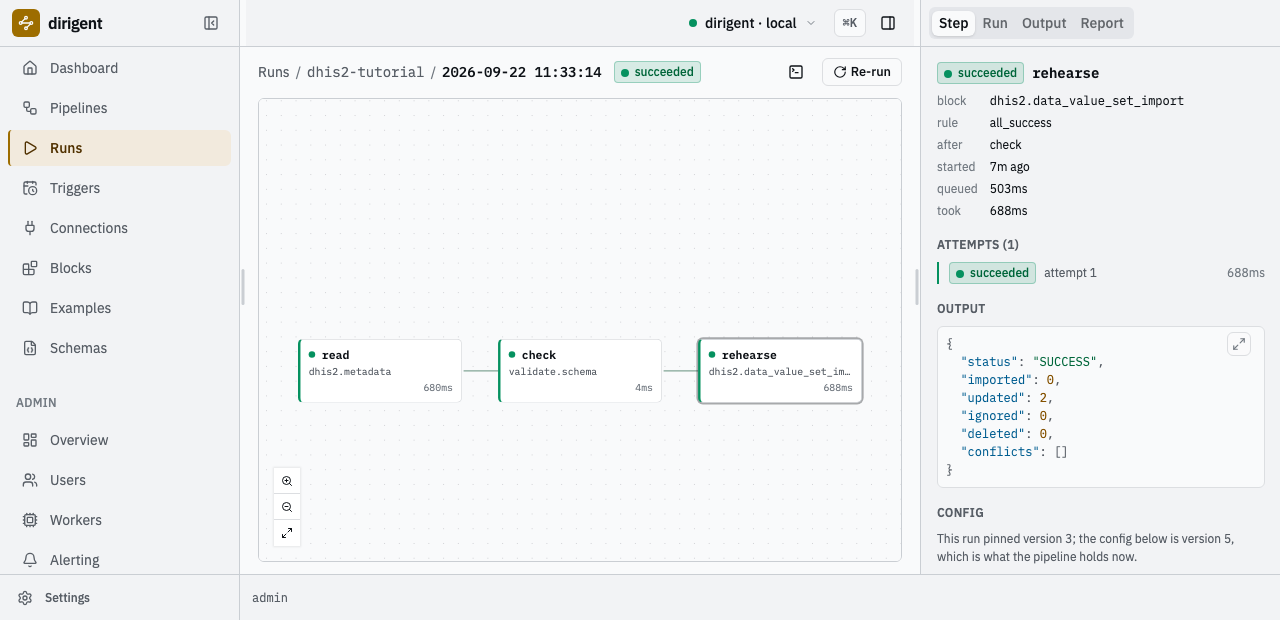
The same summary on the Runs screen, under the step that produced it.
The pipeline is three steps now, and the builder draws what the document said:
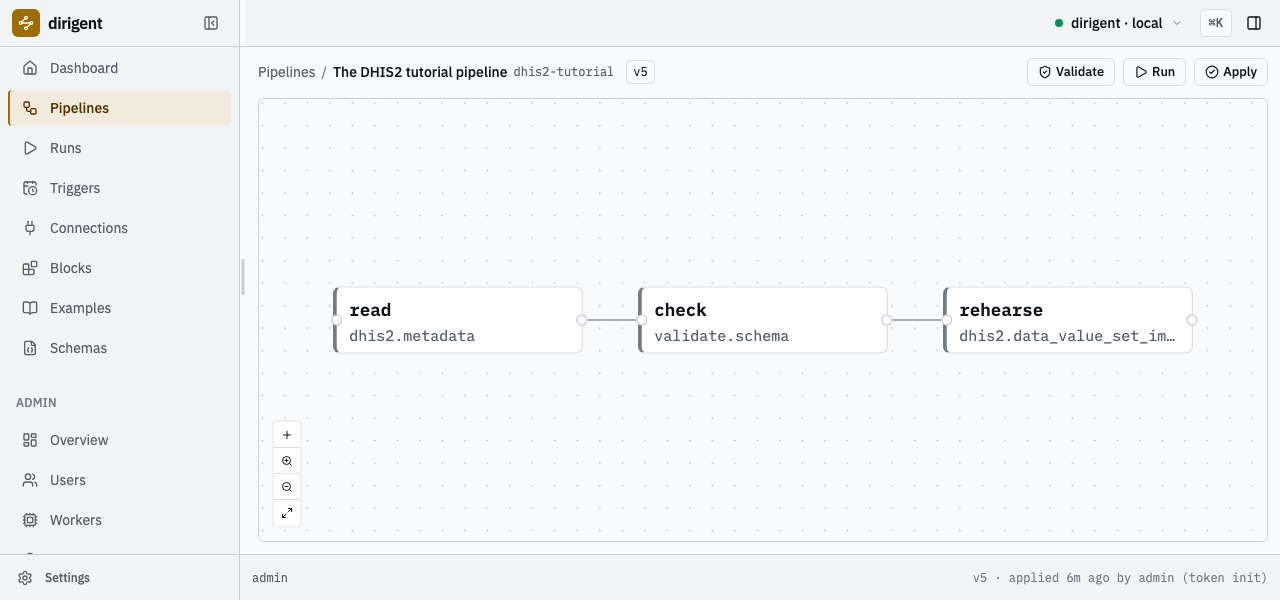
read to check to rehearse. The edges are the depends_on lines.
dry_run is the parameter to be suspicious of
Dropping that one line turns this document into a real import of these values. Do that
against your own instance, never against the shared demo. DHIS2 spells a rehearsal
differently per endpoint, too: dryRun=true on /api/dataValueSets, but
importMode=VALIDATE on /api/metadata. Reaching for the wrong spelling does not fail --
it imports.
6. When it goes wrong
Two failures, and the difference between them decides whether the budget the read now carries is worth anything.
A refusal is not retried
Break the read the way a tired person breaks it -- a collection name without its s:
read failed  dhis2.metadata, attempt 1, rejected
  the instance's version knows no metadata resource named 'organisationUnit'
steps
┏━━━━━━━━━━┳━━━━━━━━━━━━━━━━━━━━━┳━━━━━━━━━┳━━━━━━━┳━━━━━━━━━━┳━━━━━━━━┳━━━━━━━━━┳━━━━━━━━━┳━━━━━━━┓
┃ step     ┃ block               ┃ outcome ┃ after ┃ attempts ┃ queued ┃ running ┃ waiting ┃ items ┃
┡━━━━━━━━━━╇━━━━━━━━━━━━━━━━━━━━━╇━━━━━━━━━╇━━━━━━━╇━━━━━━━━━━╇━━━━━━━━╇━━━━━━━━━╇━━━━━━━━━╇━━━━━━━┩
│ read     │ dhis2.metadata      │ failed  │ -     │ 1        │ 0.1s   │ 0.6s    │ 0.0s    │ -     │
│ check    │ validate.schema     │ skipped │ read  │ 1        │ 0.0s   │ 0.0s    │ 0.0s    │ -     │
│ rehearse │ dhis2.data_value_s… │ skipped │ check │ 1        │ 0.0s   │ 0.0s    │ 0.0s    │ -     │
└──────────┴─────────────────────┴─────────┴───────┴──────────┴────────┴─────────┴─────────┴───────┘
One attempt, with a budget of three. The pack classified the failure rejected, and a
rejected failure spends no budget: the instance will answer the same way in two seconds and in
two hours. The message is DHIS2's own verdict, resolved against the version this connection
reported, which is one of the things the connection kind bought in section 2.
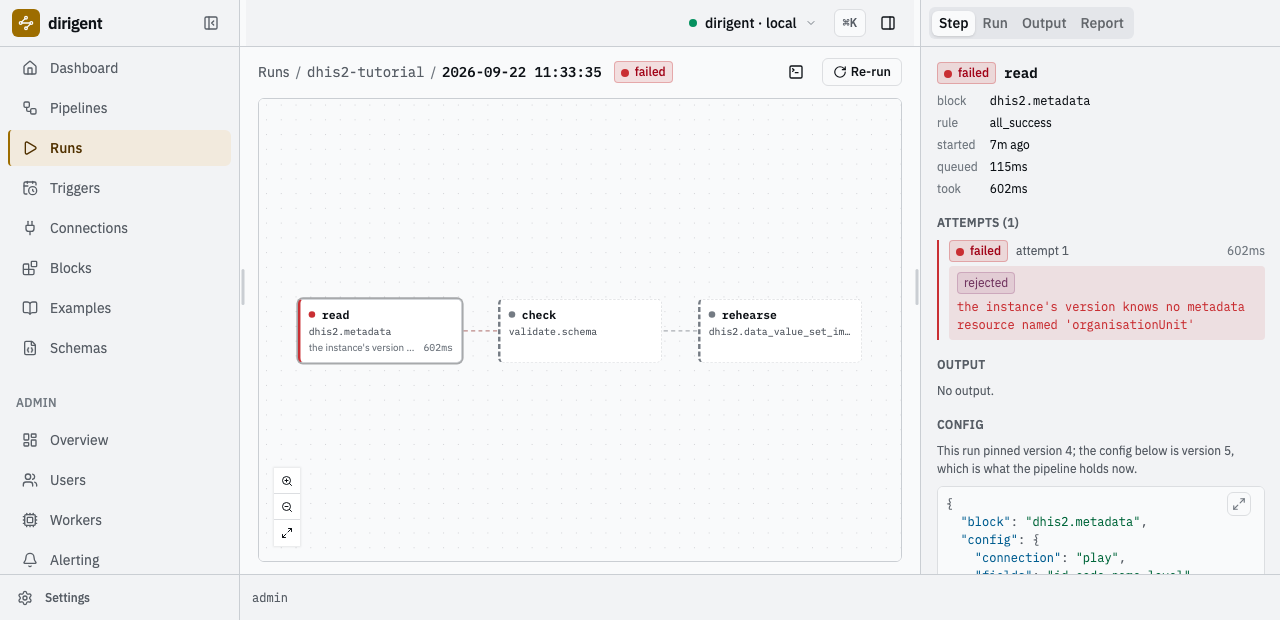
A rejected step, its one attempt, and the steps that never ran.
Put the s back and apply again.
A transient failure is retried
The other half needs no broken document -- only an instance that is not answering. --connections
replaces a connection by code, so point the same play code at a port nothing is listening on,
in tutorial-connections-down.yaml:
connections:
  play:
    kind: dhis2
    config:
      base_url: http://127.0.0.1:9
      basic_username: admin
      basic_password: district
      timeout: 5s
uv run dg run --local pipelines/dhis2-tutorial.yaml \
  --connections tutorial-connections-down.yaml \
  --schema schemas/tutorial-org-units.json
steps
┏━━━━━━━━━━━━━━┳━━━━━━━━━━━━━━━━━━━━━━━━━━━━━┳━━━━━━━━━┳━━━━━━━┳━━━━━━━━━━┳━━━━━━━━┓
┃ step         ┃ block                       ┃ outcome ┃ after ┃ duration ┃ output ┃
┡━━━━━━━━━━━━━━╇━━━━━━━━━━━━━━━━━━━━━━━━━━━━━╇━━━━━━━━━╇━━━━━━━╇━━━━━━━━━━╇━━━━━━━━┩
│ read  1 warn │ dhis2.metadata              │ failed  │ -     │ 0.0s     │ -      │
│ read  1 warn │ dhis2.metadata              │ failed  │ -     │ 0.0s     │ -      │
│ read  1 warn │ dhis2.metadata              │ failed  │ -     │ 0.0s     │ -      │
│ check        │ validate.schema             │ skipped │ read  │ -        │ -      │
│ rehearse     │ dhis2.data_value_set_import │ skipped │ check │ -        │ -      │
└──────────────┴─────────────────────────────┴─────────┴───────┴──────────┴────────┘

read failed  dhis2.metadata, attempt 1, transient
  ConnectError: All connection attempts failed
  last log lines:
    error: failed

read failed  dhis2.metadata, attempt 2, transient
  ConnectError: All connection attempts failed
  last log lines:
    error: failed

read failed  dhis2.metadata, attempt 3, transient
  ConnectError: All connection attempts failed
  last log lines:
    error: failed
Three attempts, two seconds apart, each its own row. The delay is data rather than a sleep:
each failure writes the next attempt's time into the future and the worker moves on, so nothing
holds a worker slot for the backoff. --schema is there because the document names a schema
now, and a local run holds none until it is handed one.
Every block in the pack classifies a failure the same way, and the gate from section 4 behaves like the last row:
| What happened | Class | Retried |
|---|---|---|
| A connection or read failure on the wire | transient |
yes |
| The instance answered 5xx | transient |
yes |
| The instance answered 429, rate limiting | transient |
yes |
| The instance answered any other 4xx, or refused the credential | rejected |
no |
| The client does not speak the instance's version | rejected |
no |
| A gate refused the value | rejected |
no |
429 is the one client error worth retrying: the instance is asking you to come back, and the
same call succeeds once the window has passed. That is why max_attempts above 1 is worth
writing on a DHIS2 step at all -- and why it costs nothing on the step that was simply wrong.
7. What you have
An instance on your machine with a dhis2 connection to a real DHIS2, a schema it holds, a
pipeline in five versions, and the runs behind them:
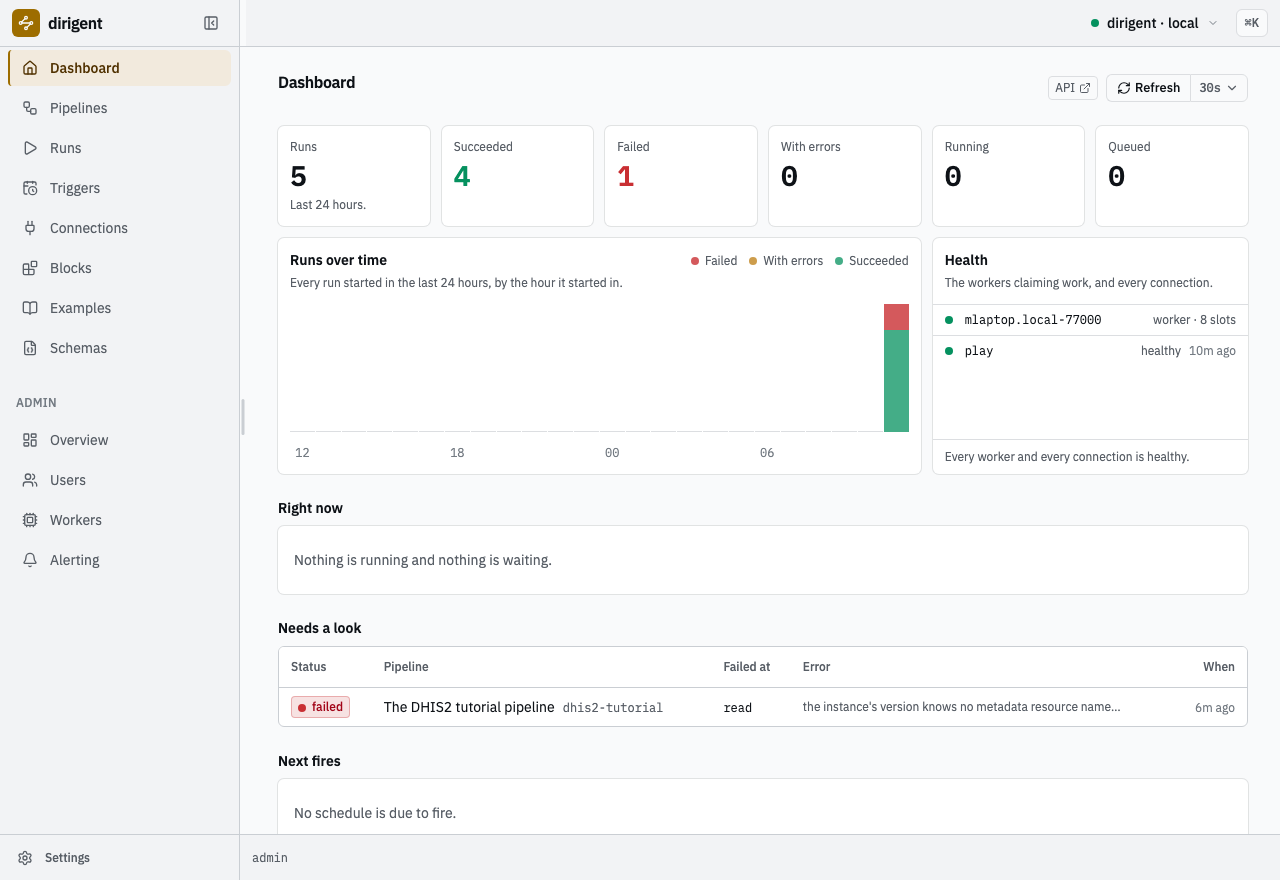
The instance after this page: the runs, the failure that is still worth looking at, and a healthy connection.
Where to go next
Seven of the pack's documents are starters: whole flows rather than single calls, each
one worth beginning a project from. They are not a shelf of their own -- each sits with the
documents it belongs beside, wearing a starter tag.
┏━━━━━━━━━━━━━━━━━━━┳━━━━━━━━━━━━━━━━━━━┳━━━━━━━━━━━━━━━━━━━┳━━━━━━━━┳━━━━━━━━━┳━━━━━━━━━━━━━━━━━━━┓
┃ code              ┃ name              ┃ tags              ┃ plugin ┃ starter ┃ needs             ┃
┡━━━━━━━━━━━━━━━━━━━╇━━━━━━━━━━━━━━━━━━━╇━━━━━━━━━━━━━━━━━━━╇━━━━━━━━╇━━━━━━━━━╇━━━━━━━━━━━━━━━━━━━┩
│ dhis2-complete-t… │ A signed-off      │ dhis2 sensor      │ dhis2  │ *       │ 2 blocks          │
│                   │ month, then the   │                   │        │         │                   │
│                   │ data              │                   │        │         │                   │
│ dhis2-rebuild-th… │ Rebuild, then     │ dhis2 analytics   │ dhis2  │ *       │ 2 blocks          │
│                   │ read              │                   │        │         │                   │
│ dhis2-rehearse-i… │ Rehearse an       │ dhis2             │ dhis2  │ *       │ 2 blocks          │
│                   │ import            │                   │        │         │                   │
│ dhis2-export-res… │ Export, then      │ dhis2 transform   │ dhis2  │ *       │ 2 blocks          │
│                   │ reshape           │                   │        │         │                   │
│ dhis2-export-val… │ Export, then      │ dhis2 validate    │ dhis2  │ *       │ 1 schema, 2       │
│                   │ check the shape   │                   │        │         │ blocks            │
│ dhis2-import-fro… │ Move a data value │ dhis2 storage     │ dhis2  │ *       │ 4 blocks          │
│                   │ set through       │                   │        │         │                   │
│                   │ storage           │                   │        │         │                   │
│ dhis2-metadata-s… │ Snapshot a        │ dhis2 metadata    │ dhis2  │ *       │ 2 blocks          │
│                   │ metadata          │ storage           │        │         │                   │
│                   │ collection to     │                   │        │         │                   │
│                   │ storage           │                   │        │         │                   │
└───────────────────┴───────────────────┴───────────────────┴────────┴─────────┴───────────────────┘
It copies the document into pipelines/ verbatim -- comments, the TO MAKE IT YOURS paragraph
and all -- rewriting three lines: the code:, the dropped starter tag, and the
connections: block, which goes so that the instance will store the document, its code
dhis2-demo named under requires.connections instead. Your connection here is coded play,
so either create a second one coded dhis2-demo or change that one line in the copy. The
Examples screen is the same catalogue, and it says per document what this instance is still
missing:
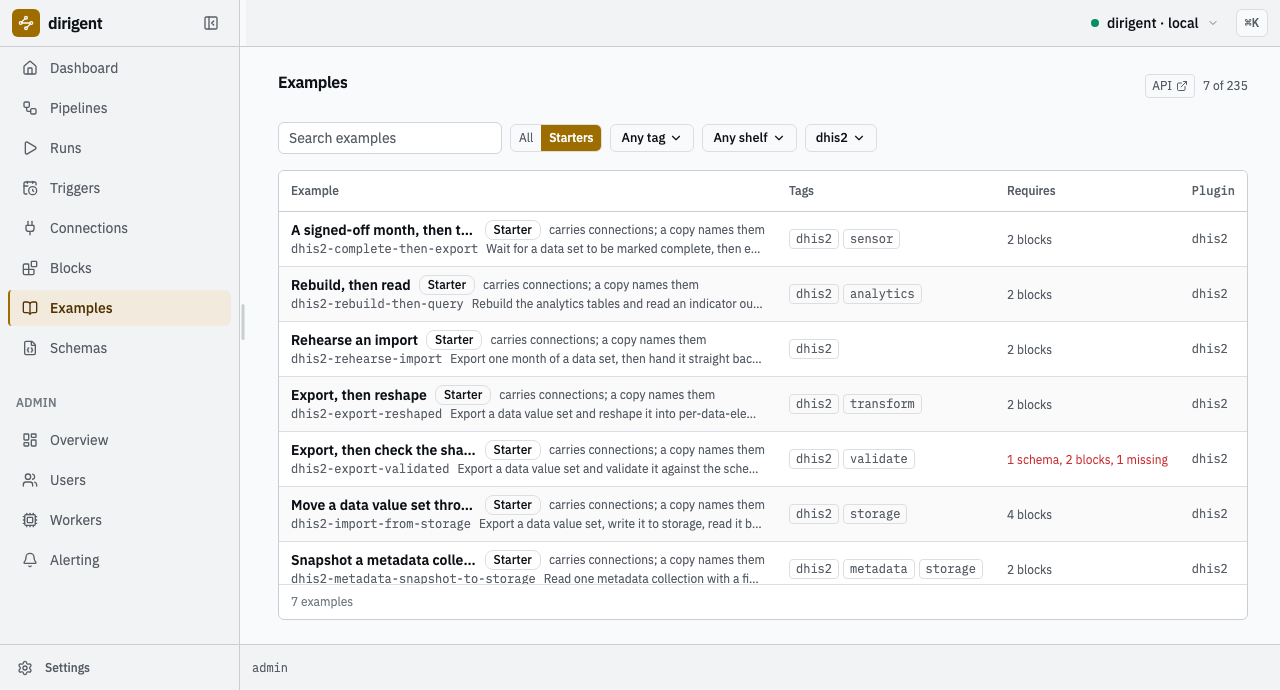
The starter set, each row saying it carries its connections and a copy names them. Only the schema gate is short of anything here: this instance holds the tutorial's schema, not the one that document names.
From here:
dhis2-composeis the shelf this tutorial's last two sections were heading towards: adhis2.*step beside one of the engine's own -- a jq reshape, a fan-out over org units withfor_each, a write to storage and the read back, a month moved between instances in four hops.- The block reference is every block's config and output, exactly as the catalog publishes them: exports, imports, the analytics rebuild and its queries, the three tracker collections, and the completeness sensor that holds a run until a month is signed off.
- The formats are the three this page used, and what they do and do not accept.
- The generic-HTTP shelf is the way out when a call has
no block yet:
http.requestover a plainhttpconnection to the same instance. - Dirigent's own documentation is where schedules, sensors, fan-out, storage, alerting and the production stack live. Nothing on those pages is DHIS2-specific, and nothing here had to be taught twice.
The document in full
# Read the organisation units under one chiefdom, hold the answer to a shape, and rehearse a
# data value import at the first of them.

format: dirigent/v1
kind: pipeline
code: dhis2-tutorial
name: The DHIS2 tutorial pipeline
description: Read organisation units, gate them on a schema, and rehearse an import at the first one.

tags: [dhis2, tutorial]

requires:
  blocks:
    - dhis2.metadata
    - validate.schema
    - dhis2.data_value_set_import
  connections:
    - play
  schemas:
    - tutorial-org-units

params:
  type: object
  properties:
    parent:
      type: string
      format: dhis2-uid
      default: YuQRtpLP10I
      description: The uid of the parent whose children are read. Badjia chiefdom by default.
    period:
      type: string
      format: dhis2-period
      default: "202507"
      description: The ISO period the rehearsed values belong to.

steps:
  read:
    block: dhis2.metadata
    # A read over the wire is worth retrying; what is not worth retrying declines the budget
    # on its own.
    retry:
      max_attempts: 3
      backoff: 2s
    config:
      connection: play
      resource: organisationUnits
      fields: id,code,name,level
      filter: "parent.id:eq:${params.parent}"
      order: [name:asc]

  check:
    block: validate.schema
    depends_on: [read]
    config:
      input: ${steps.read.output.body}
      schema: tutorial-org-units

  rehearse:
    block: dhis2.data_value_set_import
    depends_on: [check]
    config:
      connection: play
      data_values:
        # The envelope's dataSet, period and orgUnit are the defaults each value inherits.
        # The org unit is read out of the gate's own output, so the write goes where the
        # validated answer says and nowhere else.
        dataSet: BfMAe6Itzgt
        period: ${params.period}
        orgUnit: ${steps.check.output.value.organisationUnits.0.id}
        dataValues:
          - dataElement: s46m5MS0hxu
            categoryOptionCombo: Prlt0C1RF0s
            attributeOptionCombo: HllvX50cXC0
            value: "12"
          - dataElement: s46m5MS0hxu
            categoryOptionCombo: psbwp3CQEhs
            attributeOptionCombo: HllvX50cXC0
            value: "7"
      # Nothing is written. Dropping this line turns the same document into a real import.
      dry_run: true
When you are done, the instance is a directory: stop dg dev and delete dhis2-tutorial/ and
nothing of it is left behind.