Getting started
From nothing to a working instance. This page stands on its own: follow it top to bottom and you will have run a pipeline locally, run one against a real instance, and then stood up the three-service production shape with an admin account and a token. Nothing here assumes you have read anything else.
Install
Dirigent is a set of Python packages. The command line is dirigent, with dg as the short
alias, and it is both the operator's remote for a running instance and the process entry point
a container runs.
That tool-installed dg is what runs dg init. A project it scaffolds is a uv project that
pins its own dirigent, so inside one the pinned runtime is reached as uv run dg and the tool
dg is only ever the scaffolder.
Two other ways to have dg: uv sync in a clone and uv run dg, or the one inside the
published image, docker compose exec server dg ..., which needs nothing on the host.
That gives you the CLI, the engine, the built-in blocks, and the server, because they are dependencies of the CLI package. You need Python 3.13 and uv.
That moves every dirigent package, not only the CLI: each one pins its dirigent dependencies at the release's exact version, so the whole set arrives on the new release together.
From source, which is what a contributor does:
git clone https://github.com/winterop-com/dirigent
cd dirigent
make install          # uv sync --all-packages
uv run dg --version
Every dg below becomes uv run dg in a source checkout. make check is the read-only gate:
ruff, mypy, pyright, the UI's own checks, and the fast test lane. make gate is what CI runs,
which is the same static half with the tests once under coverage.
The zero-setup smoke test
The fastest way to see it work needs no server, no database, and no Docker:
dg run --local - <<'YAML'
format: dirigent/v1
kind: pipeline
code: hello-world
steps:
  greet:
    block: value.const
    config:
      value: hello from dirigent
YAML
2026-09-18T22:13:09.129+02:00 [info    ] started                        [run] pipeline=hello-world run_id=01a0b626-c486-7403-9b58-93a3bfaf00e0 local=true scratch=file:///var/folders/7t/m0y6vhq508n4fsfg85vhgjkh0000gp/T/dirigent-local-3k5tyvmd/artifacts/runs/01a0b626-c486-7403-9b58-93a3bfaf00e0 root=/var/folders/7t/m0y6vhq508n4fsfg85vhgjkh0000gp/T/dirigent-local-3k5tyvmd
2026-09-18T22:13:09.125+02:00 [info    ] queued                         [step greet] block=value.const attempt=1
2026-09-18T22:13:09.170+02:00 [info    ] succeeded                      [step greet] block=value.const attempt=1 duration_ms=10
2026-09-18T22:13:09.174+02:00 [info    ] finished                       [log greet] duration_ms=0 output_bytes=31
2026-09-18T22:13:09.283+02:00 [info    ] succeeded                      [run] pipeline=hello-world run_id=01a0b626-c486-7403-9b58-93a3bfaf00e0 exit_code=0
steps
┏━━━━━━━┳━━━━━━━━━━━━━┳━━━━━━━━━━━┳━━━━━━━┳━━━━━━━━━━┳━━━━━━━━━━━━━━━━━━━━━━━━━━━┓
┃ step  ┃ block       ┃ outcome   ┃ after ┃ duration ┃ output                    ┃
┡━━━━━━━╇━━━━━━━━━━━━━╇━━━━━━━━━━━╇━━━━━━━╇━━━━━━━━━━╇━━━━━━━━━━━━━━━━━━━━━━━━━━━┩
│ greet │ value.const │ succeeded │ -     │ 0.0s     │ value=hello from dirigent │
└───────┴─────────────┴───────────┴───────┴──────────┴───────────────────────────┘
- is the document on stdin, which is why this needs no file; a path or a URL works the same
way. --local applies and runs it in a throwaway SQLite instance in a temporary directory,
streams what each step does, and deletes the database on the way out. It is the same apply, the
same engine, and the same worker loop a real instance uses -- a local run that executed
differently would prove nothing.
Nothing was granted for this: value.const only emits its configured value. A block that
executes code on the worker -- shell.run, docker.run -- is refused unless allowlisted by
block id, and --enable-unsafe shell.run is the one-command version of that grant;
the allowlist is where
that begins. Most blocks need nothing.
The exit code is the run's outcome, so this works in CI directly. See exit codes for what each one means.
A laptop instance: dg dev
One asyncio process holding four parts, and the file they coordinate through:
- the API, on
http://127.0.0.1:3333, with its OpenAPI viewer at/docs, - the web UI, served at
/by the same process, from the bundle in the installed package or the onemake uibuilds in a checkout, - the scheduler, which turns clock time into runs,
- one worker, which claims and executes,
- a SQLite file,
.dirigent/state/dirigent.db, which is where all of it coordinates.
Everything an instance keeps locally -- that database, and the artifacts its runs write --
lives under .dirigent/state/, created on start. That path is relative to the directory you
start dg dev in, so starting it somewhere else is a different instance: its own
database, its own runs, none of the history you had. The record it writes on start says which
one you got.
Its account is dev, with the password dirigent-dev. dg dev creates that admin on an
empty database, together with an API token named dev whose secret the starting record carries
once. Both are fixtures of a throwaway instance rather than credentials, which is why they are
fixed and written here. The compose stack is the other shape: its first admin is admin, with
the password .env sets in DIRIGENT_BOOTSTRAP_ADMIN_PASSWORD, and nothing about it is fixed.
dg dev runs the instance that is in that directory. An instance dg init made, or one
an earlier start left, keeps its accounts, its runs and its artifacts; the schema is migrated
forward on every start. --wipe-state is how you ask to begin from nothing, and it says so in
one record when it deletes something:
Only a directory dirigent named itself is ever removed. Point database_url somewhere else
and the wipe is refused rather than guessed at, because the files beside that database are
not dirigent's to delete.
--seed fills it from a directory of documents. In a source checkout, that is the
example corpus:
Every dirigent/v1 document under examples/ is applied with its schedules paused, and the
connections the corpus declares are created first, so there is something to look at without
applying a hundred documents by hand. Each one is a record -- seed.connection,
seed.applied, seed.refused, and the closing seed.done with the counts. A document this
instance will not store is reported and passed over.
At a terminal it renders its lines; in a pipe or a container's log it writes NDJSON, which
dg format renders back. The starting record says where its state is, what it bound, the admin it made, and the token, once; then
it stays quiet until something happens. Detail is what -v is for:
2026-01-01T18:22:23.069+01:00 [info    ] starting   [process] process=dev api=http://127.0.0.1:3333 docs=http://127.0.0.1:3333/docs admin=dev state=/home/you/my-pipelines/.dirigent/state token=osZDN7zM-DnWPb3rVJHWsxpgkekZylez1MF8E-GpgnI migrated=0001_baseline
2026-01-01T18:22:23.382+01:00 [info    ] ready      [process] process=dev
Leave it running. In a second terminal, tell the CLI which instance to talk to and how to
authenticate to it, using the api and token off that record:
jq takes the token straight off the stream if you would rather not copy it by hand:
dg dev refuses to start on anything but SQLite. On PostgreSQL it would be dg server with
extra steps, and giving one thing two names helps nobody.
The first real run
dg init my-pipelines --template local --password "the one you will use"
cd my-pipelines
uv sync
uv run dg dev                    # in a second terminal, in this directory; it keeps running
uv run dg examples list --starter          # back in the first terminal, in this directory
uv run dg pipeline new report-to-file      # copies it into pipelines/
uv run dg apply
uv run dg run report-to-file --watch
dg init initialises an instance and the documents that address it: it creates
.dirigent/state/, migrates the schema, creates the first admin, and mints it one token. The
token goes into the project's .env, readable by you alone and kept out of git, and the
local profile in .dirigent/profiles.yaml reads it from there whenever the shell does not
export DG_TOKEN -- so nothing has to be pasted. A generated DIRIGENT_SECRET_KEY goes in
beside it, because that .env is a settings layer as well: every command run in this
directory, dg dev included, seals connection secrets under that key, and an instance started
under a different one cannot open what it stored. uv sync builds the project's environment
from the pyproject.toml it wrote, which pins the dirigent that scaffolded it -- so every
uv run dg below is that runtime rather than whatever is on the path.
dg dev then runs what it made, and serves the UI at http://127.0.0.1:3333. Never
--wipe-state here: it would empty the directory dg init just filled and mint a development
admin of its own, leaving the token in .env addressing an account that no longer exists.
dg init --template documents stops after the documents, which is what to use when the
instance is somebody else's server. --template is also what decides whether you are asked:
at a terminal, dg init hello with none of the shape flags opens one form that asks all of
this -- where it runs, the stack's services, packs, a workflow, and the first admin -- and
naming a template answers the first question, so the command runs straight through.
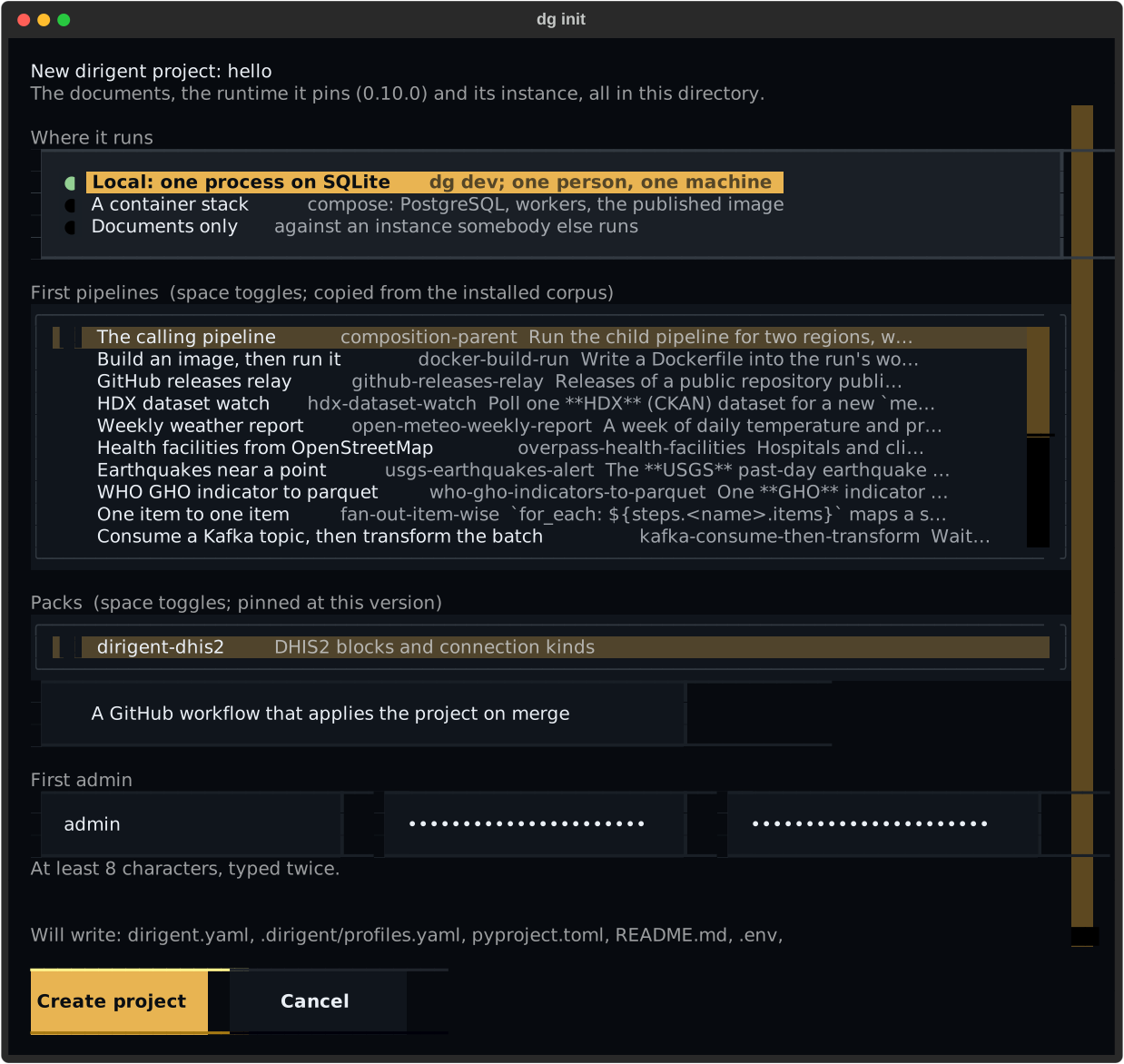
It scaffolds dirigent.yaml, which says where documents live and holds the few settings a
project is likely to change; dirigent.example.yaml, every setting there is with its default
and description, commented out and never loaded; .dirigent/profiles.yaml, saying which
server to talk to; an empty pipelines/, or the starters --pipeline named; .dirigent/.gitignore,
which keeps .dirigent/state/ out of the repository while the profiles beside it stay
committable; pyproject.toml, which pins the dirigent runtime the project runs on; a
README.md with the commands for the template; and a root .gitignore for .venv/ and
__pycache__/. A directory that already has a pyproject.toml or a README.md keeps its
own: dg init says which files it left alone, and adding dirigent-cli to that
pyproject.toml is then yours to do.
The first server
dg init my-instance --template compose --password "the one you will use"
cd my-instance
uv sync
docker compose up -d
uv run dg auth login --username admin
--template compose writes the same documents plus compose.yaml, a Dockerfile, a .env
holding a generated DIRIGENT_SECRET_KEY and the password given here, and a root
.gitignore keeping that .env out of the repository. The stack it describes is PostgreSQL, the API with
the scheduler embedded, object storage for artifacts and a worker, all running the image that
Dockerfile builds on ghcr.io/winterop-com/dirigent, pinned to the version of the dg that
wrote the file. --service docker adds the workers' own daemon, --service kafka and
--service rabbitmq a broker; --pack dirigent-dhis2
installs the pack into the image. Adding one later is a line in that Dockerfile and
docker compose up --build.
Nothing is initialised on this machine: no state directory, no migration and no token, because
the instance is the containers. The first admin is admin, created from
DIRIGENT_BOOTSTRAP_ADMIN_PASSWORD in that .env the first time the server comes up, and
uv run dg auth login mints the token from it. dg dev is not part of this: it is the single-process
instance, and this is a server. Everything in pipelines/ is applied at boot, and dg apply
sends one now.
dg apply sends every document in the project to the instance, which stores each as an
immutable version. It is idempotent: a document whose digest matches the stored one is
unchanged, so applying the whole repository on every merge does not accumulate a version per
commit. dg apply --dry-run prints the plan without writing.
dg examples list is the corpus this instance ships -- every installed plugin's documents,
the packs' included. One that wears the starter tag may be copied into the project with
dg pipeline new CODE, which writes pipelines/CODE.yaml verbatim: it rewrites the code:
line, drops that tag, and lifts every section the original carried -- its connections:, its
schemas: -- into requires: instead, because an instance refuses to store a document that
carries one. It then says what the instance has to hold before it will apply.
dg examples show CODE prints any of them without copying.
dg run report-to-file --watch starts a run and streams its step transitions and block output
until it settles, then exits with the run's outcome.
That is the whole loop. The same instance is a web UI at http://127.0.0.1:3333, where the
account you just made logs in and the run you just started is on screen.
The tutorial builds a realistic pipeline through it -- a sensor, a fan-out, an
error branch -- and breaks it on purpose.
Examples is the same corpus dg examples list reads, on a screen beside Blocks. A row is
the document's title, its code and the first line of its description, with the tags it wears,
the shelf and the distribution it came from, and what it needs of this instance -- each
required connection, schema and block checked against what the instance actually holds, so
"2 connections, 1 missing" is a fact about this server rather than about the file. One that
opted into being copied wears a Starter badge, and a document carrying its own connections:
or schemas: says so, because an instance refuses those at apply. The filters are the tags,
the shelf, the distribution and a Starters-only switch, and they live in the address, so a
narrowed catalogue is a link; a block row on the Blocks screen says how many of these
documents require it and links here narrowed to that block. Choosing a row opens the whole
file beside the listing -- comments and all, in the editor a document is written in, with the
requirements listed item by item.
From a starter is how one of them becomes a pipeline of yours. It sits in the New pipeline
menu on the Pipelines screen, on the Examples panel as Use as starter, and on the empty
canvas of a new document; it opens a search over the installed starters, shelved by
distribution and directory, with what each needs of this instance on the row. Choosing one
makes the copy dg pipeline new would have written -- the document verbatim, the code: line
rewritten and the starter tag dropped -- and opens the editor on it, on the source pane,
where the code is renamed. A copy names under requires: the connections and schemas the
original carried, so the panel's preflight tells you what to create rather than the apply
refusing the copy for holding them. Nothing is applied until you apply it, and the editor's
panel says what is still missing.
The real thing: three services
The whole sequence, in order, is A server
That page runs from an empty directory to a pipeline running on the compose stack with no branches in the way. What follows here is the same ground with the alternatives left in, which is useful once you know what you are choosing between.
infra/compose.yaml at the repository root is the shape to start from in production. Three of
its services are dirigent's own processes, and the rest are what they stand on:
| Service | What it is | Why it is separate |
|---|---|---|
postgres |
PostgreSQL 17 | All coordination lives here. There is no broker and no second store |
s3 |
Object storage for artifacts, with a one-shot s3-bucket creating the bucket |
A step's output must be readable by whichever worker claims the next step, which a container-local disk is not |
migrate |
A one-shot dg db upgrade, and the connection the bucket is reached through, that the other two wait on |
Scaling the server out must not mean N processes racing to migrate one schema |
server |
dg server: the API, with the scheduler embedded |
Needing a service of its own just to get a clock is a poor default. Leadership is an advisory lock, so embedding it costs nothing when it later moves out |
docker |
A Docker daemon of the worker's own | The docker.* blocks drive it over TLS, so a pipeline's containers are never the host's and no host socket is mounted anywhere |
worker |
dg worker: claims due work, executes it, probes what is waiting |
Execution scales independently of the API. A worker opens no port and nothing connects to it |
migrate, server and worker are one image in which dg server, dg worker, and
dg scheduler are the same code with different entry points. Everything those three share is a
database URL, a secret key, and where artifacts live.
Configure it
Two values in .env have no safe default.
DIRIGENT_SECRET_KEY is the envelope key that connection secrets and webhook signing
secrets are encrypted with. Generate one:
A well-formed Fernet key is used as-is. Anything else -- a passphrase you typed -- is hashed into a valid key rather than refused, so a human-typed value yields a working instance; prefer the generated one. Losing this key means losing every stored connection secret, and there is no rotation tooling, so back it up somewhere that is not beside the database backup.
DIRIGENT_BOOTSTRAP_ADMIN_PASSWORD creates the first admin account. It is optional; see
first admin for the alternative.
Then:
The server publishes 3333. Point the CLI at it:
To scale execution, docker compose --project-directory . -f infra/compose.yaml up --scale worker=3. What limits that number is the
database connection pool, and the arithmetic is in
scaling workers.
The first admin
Nothing can authenticate before an account exists, so account creation has a path that does not go through the API. There are two.
Unattended, for a container. Set DIRIGENT_BOOTSTRAP_ADMIN_PASSWORD in .env before the
first docker compose --project-directory . -f infra/compose.yaml up. When the server starts against a database with no accounts, it
creates an admin named admin with that password, and nothing else. It is one-way: it does
nothing
the moment any account exists, so leaving it set on every deploy cannot reset a live instance's
password.
By hand.
dg admin user create runs against the database, not the API. Like dg db upgrade, it
opens DIRIGENT_DATABASE_URL directly. It has to: the first account on a fresh instance must
exist before anything can authenticate to the endpoint that would create it. So run it
somewhere that can reach the database and has the same configuration the server has --
docker compose --project-directory . -f infra/compose.yaml exec server dg admin user create ada --role admin in the compose stack.
--role is required, on the command line and on POST /api/v1/users alike: there is no
default, so nothing makes an admin by leaving a field out.
The first token
An account is a password, and the CLI is a script's client rather than a browser, so the thing you actually carry around is a token.
dg auth login verifies the password against the API and then mints an API token named
cli-<username>, which it writes as a token.issued record; at a terminal that is the
export line to paste. dg admin token create NAME mints one under
a name you choose, which is what a CI job should hold.
The secret prints exactly once. The instance stores only a SHA-256 of it plus the first eight characters, so that a listing can tell two tokens apart without holding either. There is no way to recover a token you did not write down -- mint another and revoke the old one.
last_used_at is what answers "is anything still presenting this?" before you revoke it. It is
accurate to the minute rather than to the request.
Both dg auth login and dg admin token create are admin-only, because minting a credential
is.
A script holding that token reads records without asking, because its stdout is not a
terminal; --json asks for them at one. It is valid on every command: a listing or a show answers with the server's own response, and a streaming command --
dg run --watch, dg run --local, dg runs logs --follow -- answers with NDJSON, one event
object per line as things happen. Nothing but JSON reaches stdout, and a command that would
have prompted for a value fails with a problem object instead of blocking on a pipe.
The record kinds and their fields are in the command line.
Pointing the CLI at an instance
Two ways, and the second is the one to settle on.
Environment variables, which is what dg dev puts on its starting record and what a CI job sets:
export DG_URL=https://dirigent.example.org
export DG_TOKEN=...
dg auth status                     # says which server, and who you are
Profiles, which are durable. A profile names a server and how to obtain a token for it, in
.dirigent/profiles.yaml beside your pipelines or ~/.config/dirigent/profiles.yaml for the
whole machine. A token can be inline, read from an environment variable, or produced by any
command -- pass show dirigent/prod, say -- so a production token never has to sit in a file.
cd-ing into a pipeline repository then points the CLI at that repository's server with no
flag to remember, and dg --profile prod ... switches deliberately. The full syntax and the
precedence rules are in the command line.
Ports
| Port | What |
|---|---|
| 3333 | The dirigent API server (DIRIGENT_PORT), and what dg dev binds |
| 3334 | The documentation site make docs serves on a contributor's machine |
3334 is a local convenience only, adjacent to 3333 rather than mkdocs' default of 8000 so the
docs and an instance sit next to each other. It is no part of a deployment, and nothing in
infra/compose.yaml or the image mentions it.
Note that DIRIGENT_HOST defaults to 127.0.0.1, not 0.0.0.0. In a container you want
0.0.0.0 with the port published by the runtime, which is what the image already sets.
It did not work
The four things a first-timer actually hits.
"cannot reach ..." or "does not look like a dirigent instance". The CLI is pointed at the wrong place, or nothing is listening.
dg auth status                     # which URL, from which source, and whether it authenticates
curl -s -D - -o /dev/null http://localhost:3333/health | grep -i x-dirigent-version
Every response a dirigent server sends carries X-Dirigent-Version. If that header is absent,
something else is on that port -- most often the documentation site on 3334, or a stale tunnel.
401, or "no token". DG_TOKEN is unset, or the token was revoked, or it belongs to a
different instance.
A token is not transferable between instances: its hash lives in that instance's database.
A run is created but never starts. Nothing is claiming work.
dg system workers                  # is anything registered, and is it stale?
dg system info                     # workers_live, and every connection's last check
docker compose logs worker
Zero live workers is the common case, and no health probe reports it -- a server with no
workers is perfectly ready, it just never executes anything. On PostgreSQL, check the worker
container actually started: dg worker refuses SQLite outright, with exit code 3 and a message
saying why.
"executes code on the worker and is disabled". shell.run and docker.run
execute code on a worker and are refused unless the instance names their id in
DIRIGENT_ENABLED_UNSAFE_BLOCKS. For one local run, --enable-unsafe shell.run. For an
instance, set the variable on the workers as well as the server, because the gate is
enforced both when the run is created and again when a worker claims the step. See
the allowlist.
The instance refuses to start, naming the pool. A message about
database_pool_size plus database_max_overflow against worker_concurrency means the
connection pool cannot cover the concurrency configured on top of it. Raise the pool or lower
the concurrency; the reasoning is in scaling workers.
For anything else, -v shows the engine's own events and the API calls the CLI makes, and
-vv shows everything:
Where to go next
- Tutorial -- one realistic pipeline end to end, broken on purpose.
- Concepts -- pipeline, step, block, run, item, attempt, connection, trigger.
- The command line -- profiles, projects, parameters, the whole command tree.
- Operations -- every setting, scaling, backups, health checks, monitoring.
- Security -- the threat model, and the secrets lifecycle.
Licence
Dirigent is source-available under a proprietary licence: the source may be read, and any other use -- running, copying, modifying or distributing it -- requires written permission from the copyright holder.